
Klede Plus
ZivsyEntertainment
4.71.78K Reviews
- Version
- 1.1.5
- Installs
- 100.00K
- Age Rating
- Teen
Screenshots
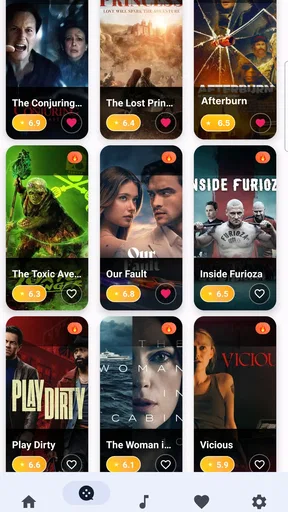
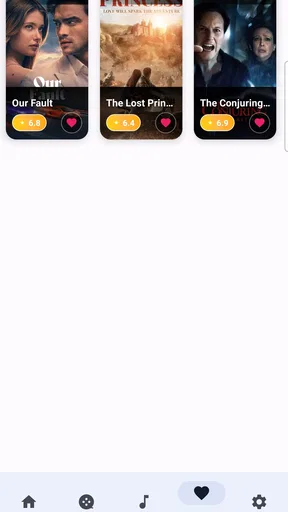
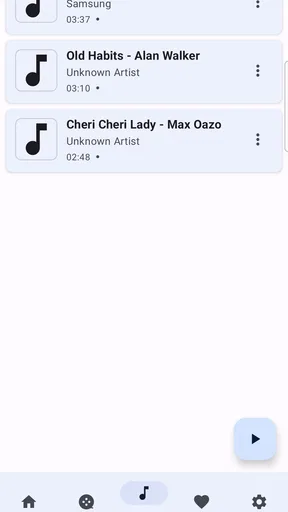
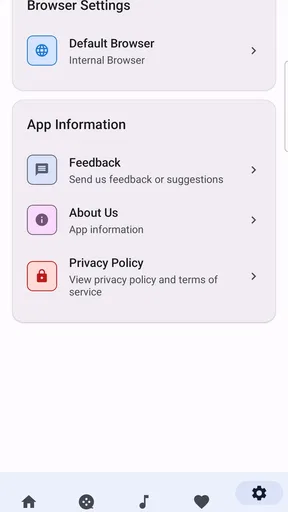
Our Review of Klede Plus
 Analysis by Appyee
Saving a web page is easy; returning to it with a clear reason is much harder. That is the problem I kept noticing while using Klede Plus, an entertainment app from Zivsy built around keeping favorite pages in an interest library. Its main appeal is not flashy discovery or a stream of recommendations. It is the simple act of turning scattered web finds into a more deliberate collection that I can revisit later.
I see the app as a lightweight middle ground between a browser’s temporary bookmarks and a fully developed research or note-taking system. It is free, carries a Teen content rating, and is available for devices running Android 8.0 or newer. The current release is version 1.1.5, and the app has already passed the 100K-install mark. Those details make it feel accessible to casual users who want a separate place for pages without committing to a complicated organization tool.
After spending time with it, my opinion is fairly clear: the strongest reason to use Klede Plus is its focused approach to building a personal library of web interests. If you regularly save articles, ideas, videos, guides, or pages you want to explore later, that focus can make your browsing habits feel less scattered. If you need deep annotation, automatic research management, or a broad content platform, the app may feel too narrow.
Turning passing web discoveries into a usable library
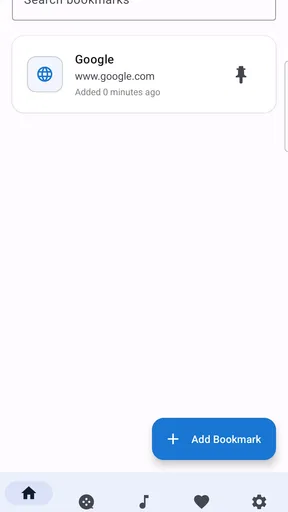
The capability that matters most here is the ability to save favorite web pages and arrange them around your interests. That sounds modest, but it changes the way I think about saved links. A normal browser bookmark often becomes a long, forgotten list. Klede Plus presents saving as the beginning of a personal collection rather than the end of a browsing session.
That distinction is useful because most pages are not saved for the same reason. I might keep one page because it explains a hobby, another because it contains an idea for a weekend project, and a third because I want to watch or read it when I have more time. Treating all of those links as identical makes them difficult to recover. An interest library gives each saved page a more intentional place in my digital routine.
I would not describe the app as a replacement for the web browser. The browser remains where I find and open pages. Klede Plus is the layer I use when a page deserves to stay visible after the original browsing moment has ended. That separation is its clearest strength: discovery happens elsewhere, while the app is dedicated to keeping the things I want to remember.
The idea also suits people whose interests change from week to week. A page saved during a burst of interest does not have to disappear into a general-purpose bookmark folder. It can remain part of a themed collection until I decide whether it is still useful. In my experience, that makes saved material feel less like digital clutter and more like a set of small, revisitable projects.
What the focused design changes in everyday use
The practical benefit is not simply having another save button. It is reducing the mental effort needed to decide what a saved page is for. When I save something to an interest library, I am more likely to return with a purpose: learn from it, compare it with another page, use it as inspiration, or remove it because the interest has passed.
That makes Klede Plus particularly suitable for light personal curation. I can imagine using it for travel ideas, recipes, outfit references, entertainment watchlists, hobby tutorials, reading suggestions, or pages connected to a new subject I am exploring. The app does not need to become a record of my entire internet history. It works better when I treat it as a selective shelf.
A useful habit is to save fewer pages but make each saved page belong to an obvious interest. This avoids turning the library into another undifferentiated inbox. I found that the app’s value depends heavily on this discipline. Saving every mildly interesting page may feel productive at first, but it recreates the same retrieval problem that makes ordinary bookmarks frustrating.
Another non-obvious advantage is the pause it creates between finding something and acting on it. Instead of opening several pages and leaving them as browser tabs, I can preserve the ones that genuinely deserve attention and close the rest. That is a small workflow change, but it helps when browsing on a phone, where too many open tabs quickly become difficult to manage.
How I would use it during a normal day
Imagine that I am commuting and come across several pages about learning photography. One explains a basic camera setting, another shows composition examples, and a third recommends a practice exercise. I could leave them open in the browser, send them to myself in a chat, or bookmark them among unrelated pages. With Klede Plus, I would save the pages as one interest library and return to them when I have time to concentrate.
The important part of that scenario is not the subject. It is the change from temporary browsing to planned revisiting. During the commute, I only need to capture the pages. Later, I can open the collection when I am ready to learn. This separates collecting from consuming, which is helpful when the material needs more attention than I can give it in the moment.
The same workflow works for entertainment. I might save a film page, an interview, and a review while browsing in short bursts. Rather than trying to remember where each discovery came from, I can keep them together as a personal entertainment interest. Since the app belongs to the entertainment category, this kind of casual, mixed media collecting feels especially natural for its audience.
I also think the library can help with gift planning. If I encounter product pages, craft ideas, books, or experiences that remind me of different people, I can separate those discoveries by interest instead of keeping them in one private message thread. The app becomes useful not because it performs the planning for me, but because it gives the pages a stable home before I make a decision.
The workflow I recommend before saving anything
My advice is to ask one question before saving: “What will I want to do with this page later?” If the answer is clear, the page probably belongs in the library. If the answer is only “it looks interesting,” I would either leave it out or save it only when I can connect it to a broader interest.
I would also create an interest around a specific outcome rather than a vague topic. “Ideas for a small balcony” is more useful than “home.” “Beginner drawing practice” is more useful than “art.” This approach makes the collection easier to revisit because the saved pages point toward an activity, not just a subject.
A further tip is to review a collection after using it. Pages that answered the original question can be removed from active consideration, while pages that remain useful can stay together. Even without turning the app into a formal task manager, this occasional cleanup keeps the library from becoming another place where unfinished intentions accumulate.
Where the app fits, and where it does not
Klede Plus feels most valuable when I want a simple personal archive rather than a complete productivity environment. It is less intimidating than a tool designed for professional research, and it gives saved pages more purpose than a browser bookmark bar usually does. That makes it a good match for people who want organization without spending time learning a large system.
Compared with ordinary browser bookmarks, the app’s interest-centered approach is more suitable for collections that grow around a theme. Browser bookmarks are convenient for pages I visit repeatedly, such as a service homepage or a reference site. Klede Plus is better for temporary interests that may develop over several days or weeks. I would keep permanent navigation shortcuts in the browser and use the app for curated discoveries.
Compared with sending links to myself through email or messaging, the library should be easier to understand later. A message thread records when I sent a link, but not necessarily why I cared about it. Klede Plus encourages me to think in terms of interests, which gives the saved material a clearer context. The trade-off is that it adds one more place to maintain, so the benefit depends on whether I value a dedicated collection enough to use it consistently.
Compared with a note-taking app, the advantage is simplicity. I do not need to write a summary every time I save a page. That is useful when I am browsing quickly or collecting visual inspiration. The limitation is equally important: if I need extensive notes, quotations, detailed tagging, or a connected knowledge base, a stronger note system will probably serve me better.
This is why I would not recommend Klede Plus to someone looking for an all-in-one research workspace. Its appeal comes from doing less, not more. It gives web pages a place in an interest library, but I would not choose it as my main tool for academic citations, project documentation, or long-form writing unless my needs were very light.
The friction points I noticed
The focused concept can also feel restrictive. People who want automatic sorting, advanced search, detailed annotations, or elaborate cross-linking may find the experience too basic. I would rather see a small, understandable library than a feature-heavy system, but that preference will not suit everyone.
There is also a behavioral weakness: saving is easy, while returning is a separate habit that users must build. The app can preserve a page, but it cannot make me read it. If I save material impulsively and never schedule time to revisit it, the library can still become a quiet backlog. That is not a failure of the central idea, but it is an important limitation for anyone who already struggles with “read later” lists.
Another trade-off is separation. Keeping pages in a dedicated app can make them easier to organize, but it also means I need to remember to open that app when I want to browse my saved interests. Someone who prefers having everything inside the browser may see this extra step as unnecessary. I found the separation worthwhile only when the collection represented a genuine theme or ongoing curiosity.
The Teen rating is worth keeping in mind for households choosing apps for younger users. It places Klede Plus in a category that parents may want to consider alongside the kind of web pages being saved and opened. The app organizes access to pages; it does not turn the wider web into a controlled, child-focused environment.
Who will get the most from it
I think Klede Plus is a strong fit for casual web curators, inspiration collectors, and people who frequently begin small interests online. It is especially appealing if your browser bookmarks have become messy but a full research platform feels excessive. The free price also lowers the barrier to trying a dedicated library instead of continuing to scatter links across tabs, messages, and notes.
It may also suit people who browse in short sessions. When I only have a few minutes, I can collect pages without forcing myself to read everything immediately. Later, the interest library gives me a more intentional starting point than trying to reconstruct what I saw earlier.
I would be more cautious if your priority is collaboration, formal project management, or detailed knowledge work. In those situations, I would choose a tool built around shared editing, structured notes, or task tracking. Klede Plus makes more sense as a personal layer for web interests than as the central system for a complicated project.
The app has a 4.7 average from around 4.9 thousand ratings, with about 1.8 thousand written reviews, which suggests that its focused approach has connected with a substantial group of users. I would still interpret that reception alongside your own habits: a well-liked saving tool is only useful if its style of organization matches the way you actually revisit pages.
My recommendation after using it
My overall impression is positive because Klede Plus understands a common problem without trying to solve every digital organization problem at once. Its best idea is the interest library: a place where favorite web pages can remain connected to a subject, mood, or personal goal instead of disappearing into a generic bookmark list.
I recommend it to anyone who wants a calm, lightweight way to collect web pages around evolving interests. Start with one specific collection, save only pages that have a clear future use, and return to it when you have enough time to explore. That workflow shows the app at its best.
I would skip it if you already have a browser-and-notes system that you maintain comfortably, or if you need professional research features. For everyone else, especially people who constantly tell themselves they will come back to a page later, this free entertainment app is worth trying. Its real strength is not saving more links; it is giving the links you care about a reason to stay together.
Verdict
Strengths of Klede Plus
- Simple interface makes browsing and managing content easy.
- Lightweight design helps it run smoothly on many Android devices.
- Useful customization options let users adjust the experience to their needs.
- Quick access to frequently used features saves time during regular use.
- Regular updates can improve stability and add useful refinements.
Limitations of Klede Plus
- Some features may require an account or additional setup before use.
- The app may show occasional ads that interrupt the user experience.
- Advanced options can be difficult to find without exploring the menus.
- Performance may vary on older devices or with limited storage space.
- Support and troubleshooting resources may be limited for certain issues.
Similar Picks in This Category
View All
Google Play Games
Google LLC3.9

Netflix
Netflix, Inc.4.8

YouTube Kids
Google LLC4.2

Disney+
Disney4.4

Prime Video
Amazon Mobile LLC4.7

Steam
Valve Corporation3.2
Frequently Asked Questions
What is Klede Plus and what can I use it for?
Klede Plus is an app designed to provide users with a convenient digital experience through its available tools and content. Depending on the version and platform, it may help you access services, manage information, or interact with app features from a mobile device. Before downloading, review the official store description carefully because features, supported regions, and available content can change over time.
Is Klede Plus free to download and use?
Klede Plus may be available as a free download, but some functions or content could require in-app purchases, a subscription, or an account. After installation, check the pricing information shown in the app and in the Google Play Store or Apple App Store. Also review whether subscriptions renew automatically, since cancellation generally must be completed through your device’s store settings.
Is Klede Plus safe to install on Android or iPhone?
The safest way to install Klede Plus is through its official Google Play Store or Apple App Store listing rather than through unofficial websites or modified APK files. Before installing, check the developer name, recent user reviews, update history, and requested permissions. Avoid granting access that seems unrelated to the app’s purpose, and keep your operating system updated for better protection.
What permissions and personal information does Klede Plus require?
The permissions required by Klede Plus can vary according to the device, operating system, and features you use. The app may request access to items such as notifications, storage, camera, microphone, location, or account information. Read the privacy policy and permission prompts before accepting them. If a permission is optional, you can usually deny it, although certain features may then be unavailable.
Does Klede Plus work offline, and which devices support it?
Klede Plus may require an internet connection for sign-in, synchronization, streaming, updates, or access to online services, while some sections could remain available offline. Compatibility depends on the Android or iOS version, device hardware, and regional availability. Check the official store page for minimum requirements, supported devices, and the latest update information before downloading, especially on older phones or tablets.
